
Payments made with Commercial and/or Corporate Credit Cards incur a 2.65% processing fee. This ensures that the fees related to Commercial and/or Corporate credit card processing are not passed on to customers who use alternative payment methods and do not require this service.
This processing fee is being administered by the third-party credit card firm that Unitil uses to process customer payments made by one of these credit card types. Unitil uses a third-party firm for credit card processing to ensure that personal identification information remains secure and encrypted for our customers. This change ensures that the fees related to Commercial and/or Corporate credit card processing are not passed on to customers who use alternative payment methods and do not require this service.
Please note that personal credit cards and electronic checks will not incur this fee. For a full list of convenient ways to pay, please visit our Billing & Payment Options webpage.
If you have any questions regarding the best payment option for you in the future, please feel free to reach out to our customer service team.
- Businesses
Yes! Call our customer service to designate another person to your account. We call this designated person an authorized third party.
You may also grant someone guest access to your MyUnitil portal. Learn more about this option here.
Info we'll need if your authorized third party is:
An existing Unitil customer:
- Full name
- Full address including zip code
NOT an existing Unitil customer and will be added to our system:
- Full name
- Full address including zip code
- Social Security Number or tax id
- Phone number
This five-minute phone call will allow your authorized third party to receive bill copies and will take effect by your next billing cycle.
You may also authorize them to have access to your MyUnitil account and notifications such as letters and outage notifications. This can be done during your set-up phone call with customer service.
You may call to request the trustee be removed from your account anytime.
- Your Account
Unitil is proud to support local energy assistance programs and provides contribution opportunities when applicable. Below is more information on the programs available in each state we serve.
Maine: Keep ME Warm
Keep ME Warm provides emergency heating assistance through a statewide partnership of Maine’s United Ways and Community Action Agencies. It is the only statewide fuel assistance fundraising effort in Maine. Donations are distributed based on need to assist individuals directly or through local organizations providing emergency fuel assistance. Your support helps make winter warmer and safer for Maine families.
To donate or learn more, visit the United Way Southern Maine's webpage: uwsme.org/keep-me-warm
Massachusetts: Good Neighbor Energy Fund
The Massachusetts Good Neighbor Energy Fund (GNEF) has provided energy assistance to hundreds of thousands of residents in temporary crisis who are struggling to pay their energy bills and do not qualify for federal or state energy funds.
To donate or learn more, visit: magoodneighbor.org
New Hampshire: Neighbor Helping Neighbor
New Hampshire's Neighbor Helping Neighbor (NHN) is a non-profit, 501(c)(3) charitable corporation created in 1986. It helps utility customers experiencing an emergency or financial hardship who are unable to qualify for other government-funded energy assistance programs. Their grants are designed to prevent these customers from having their utility service disconnected. 100% of your contribution goes directly to helping families in need, as participating New Hampshire utility companies, including Unitil cover all administrative costs. Typically, NHN assists around 1,200 New Hampshire families each year.
To donate or learn more, visit: nhnfund.org
Unitil offers Electric Vehicle (EV) Demand Charge Alternative Rates to medium (GD-2) and large (GD-3) commercial customers in Massachusetts. New EV charging stations tend to have low utilization until usage ramps up. The EV Demand Charge Alternative may help commercial customers save on demand charges.
For more information, read the tariff or view the rate summary.
- Electric Service
- Businesses
All Customers:
Unitil works year-round with organizations in all of the states we serve to bring our customers new energy savings offers and solutions.
Find Rebates & Savings Programs
Maine Customers:
Rebates and incentives are available through Efficiency Maine, a statewide group that helps businesses and residents all over Maine use energy resources more efficiently, reduce energy costs, and lighten the impact on Maine’s environment.
Massachusetts Customers:
Rebates and incentives are available through MassSave.com. Your local electric and natural gas utilities and energy efficiency service provider are taking strides in energy efficiency. As one, we form Mass Save®, with the common goal of helping residents and businesses across Massachusetts save money and energy, leading our state to a clean and energy-efficient future.
New Hampshire Customers:
Rebates and incentives are available through NHSaves.com. NHSaves is a collaboration of New Hampshire’s electric and natural gas utilities working together to provide NH customers with information, incentives, and support designed to save energy, reduce costs, and protect the environment.
- Your Account
- Electric Service
- Gas Service
- Businesses
The Budget Deferred Amount found on your bill, represents the difference between your budget charges and your actual charges. This amount will fluctuate as you progress through the budget year.
- Your Account
Log in to the MyUnitil mobile app or your MyUnitil account.
From the "Profile" tab found in the main menu, select "Notifications" at the top of the page.
Select an account number, email, phone number, and text number under the "Communication Preference" section.
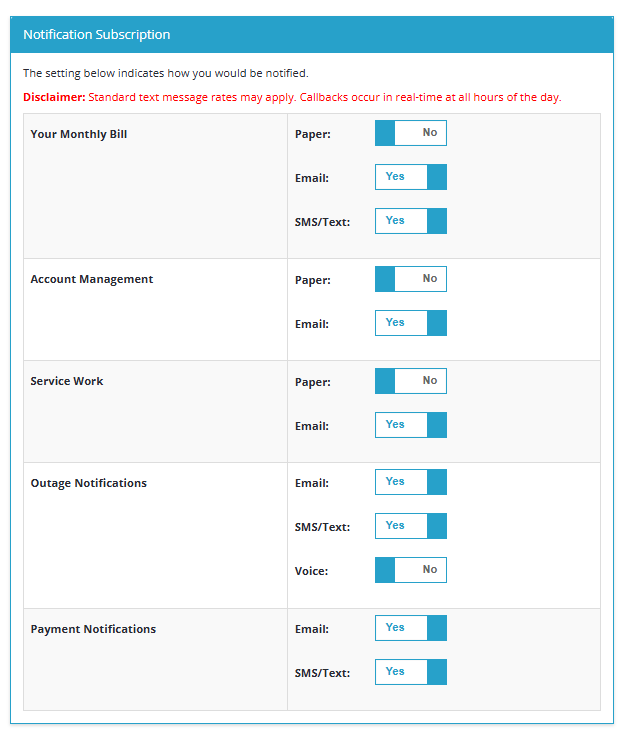
Under the "Notification Subscription" section, click the "Yes/No" toggle for receiving paper, email, SMS/Text, or Voice notifications for the available topics. Please note, you can select either paper or electronic delivery methods for each notification type, not both.
Scroll to the bottom of the page and click the "Update Communication and Notification Preferences" button to save your selections.
Learn more about Outage Notifications.
Learn more about Payment Notifications.
- Your Account
- Outages & Emergencies
Log in to your MyUnitil account.
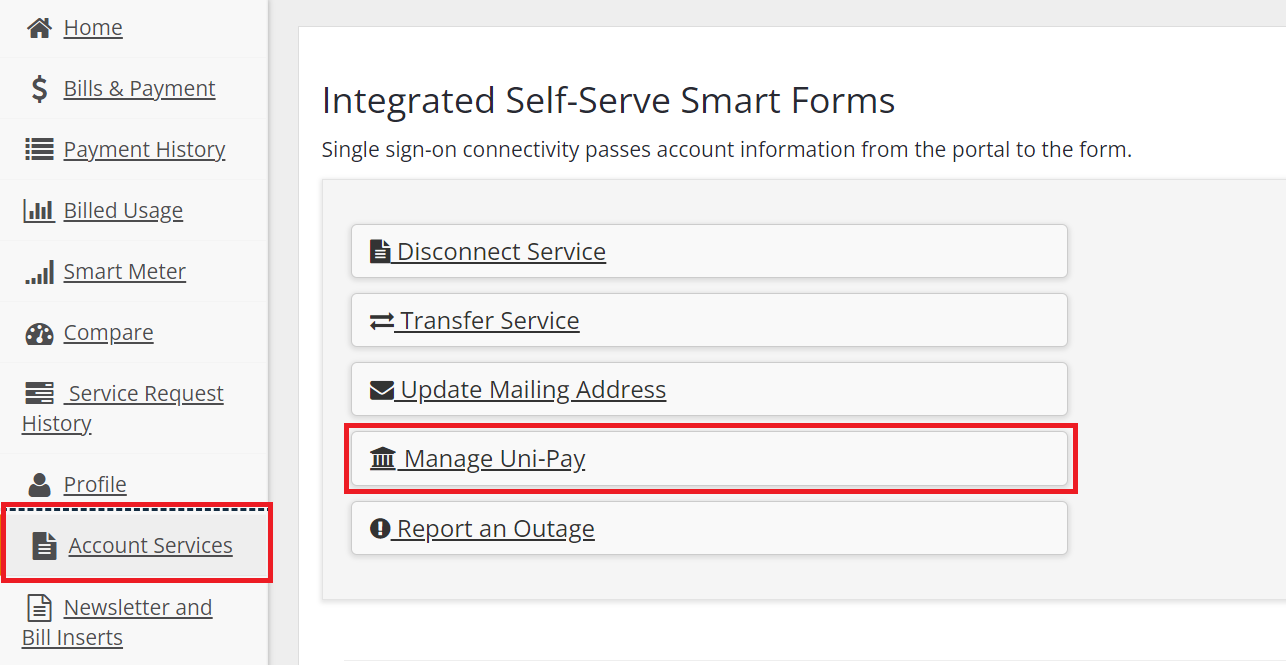
From the "Account Services" tab found in the main menu, you can set up and manage Uni-Pay, which is Unitil's autopay service.
Please note: Uni-Pay is available using a bank account (checking or savings) only.
Automatic payments may also be called: auto pay, auto payments, autopay, or automatic pay.
- Your Account
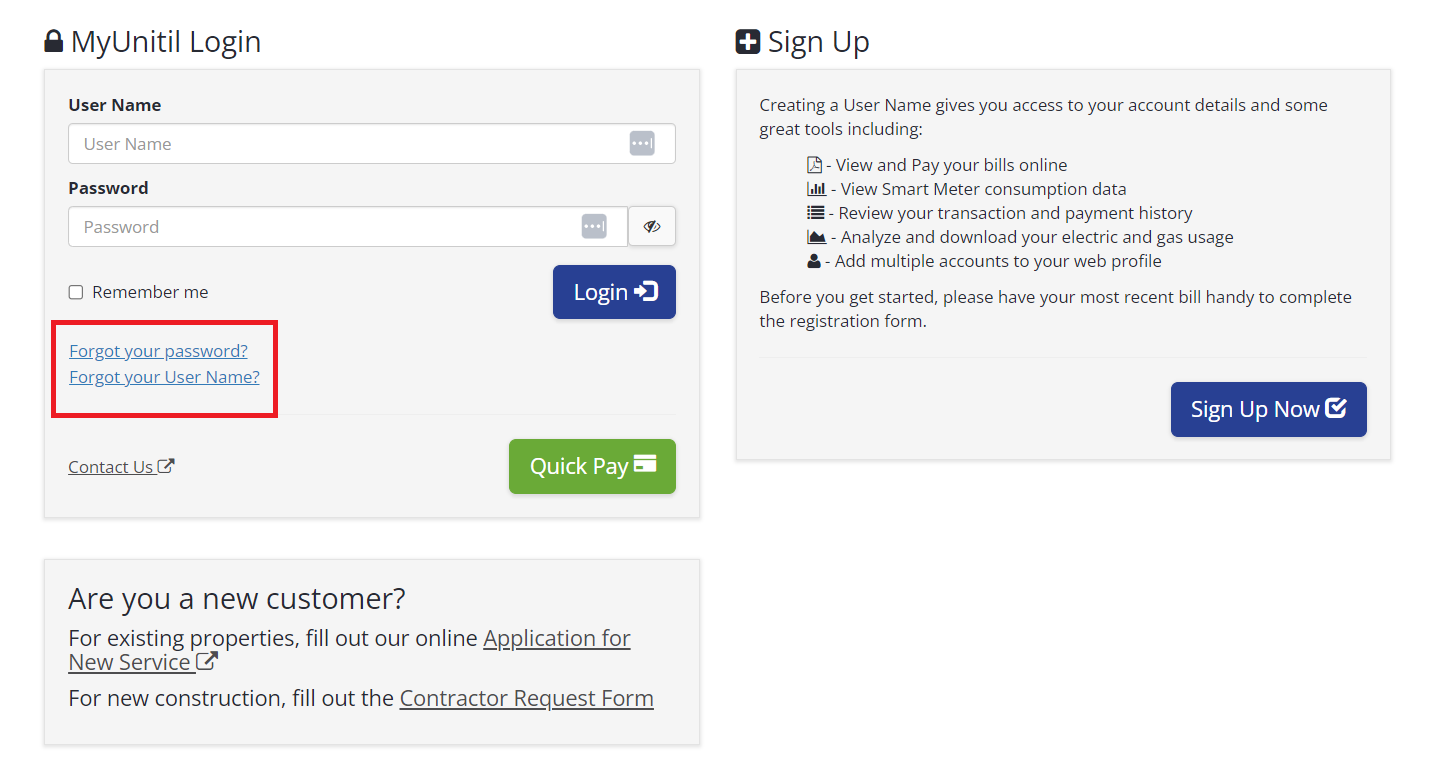
If you’re unsure of your username or password, utilize the Forgot Password and Forgot User Name links on the MyUnitil landing page or in the MyUnitil mobile app.
The Forgot User Name option utilizes your account number and a verification method to find the associated username.
The Forgot Password option sends a password reset email to the email address associated with your profile. Note that you must provide the email address that is associated with your profile in order for the system to send the password reset email.
- Your Account
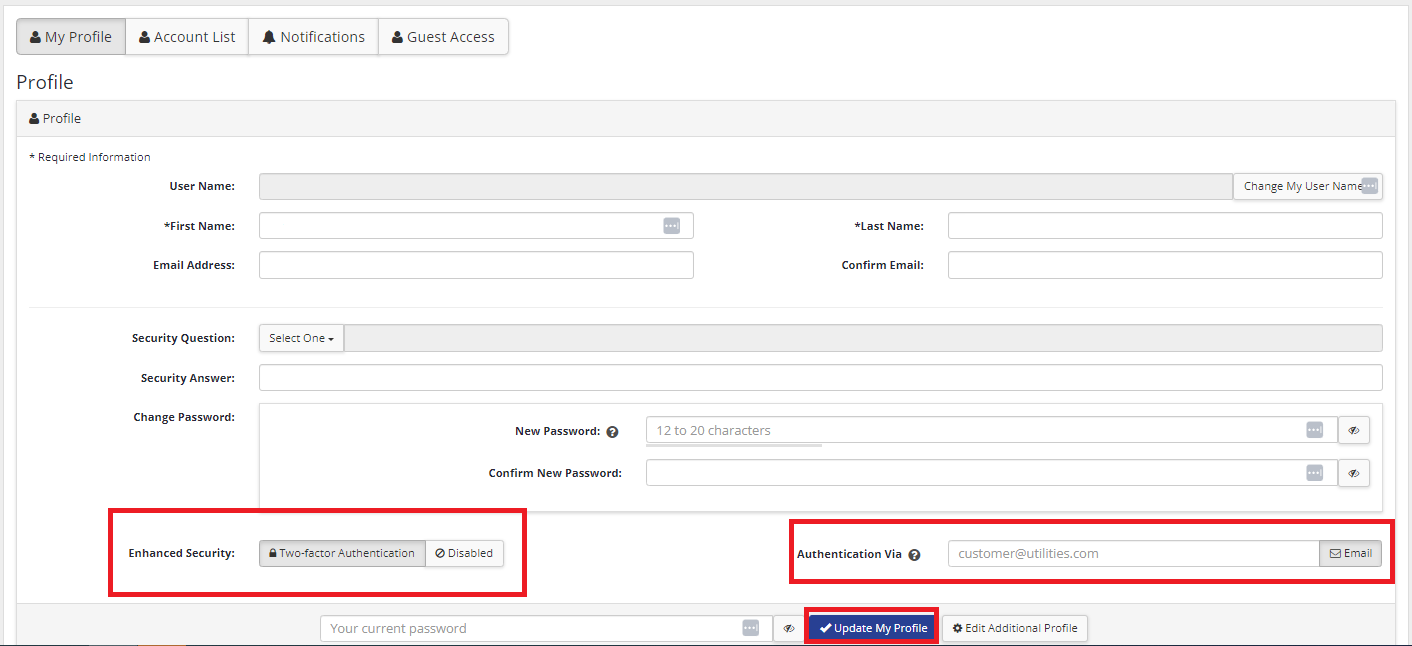
There are several options to make your MyUnitil account more secure:
- Update your password to be longer and more complex.
- Update your security question to something that’s unique and hard to guess.
- Implement Two-Factor Authentication for an additional layer of protection.
Change Password
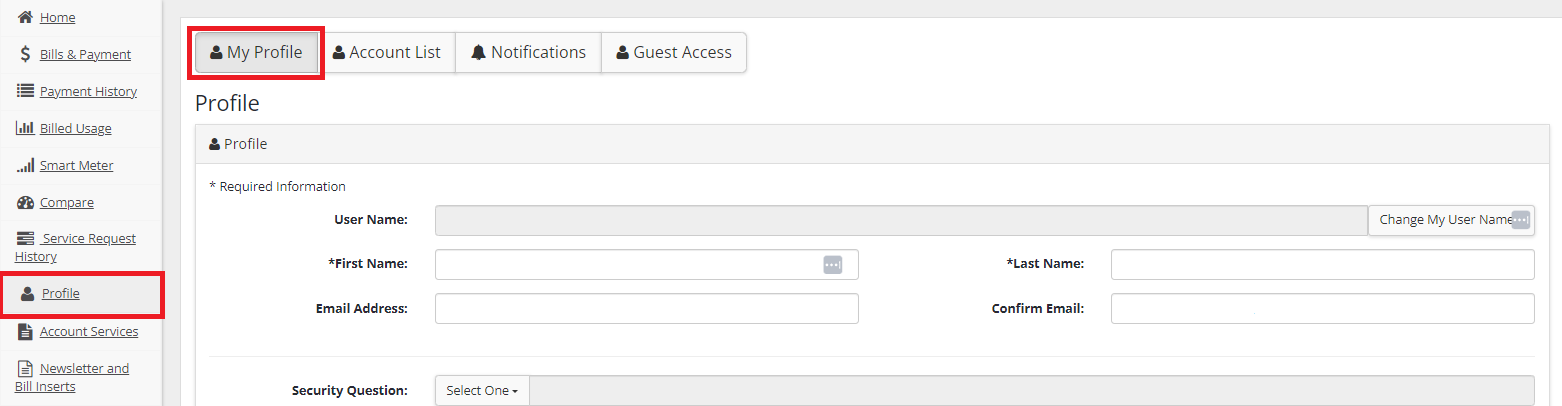
From the "Profile" tab found in the main menu, select "My Profile" located at the top of the page.
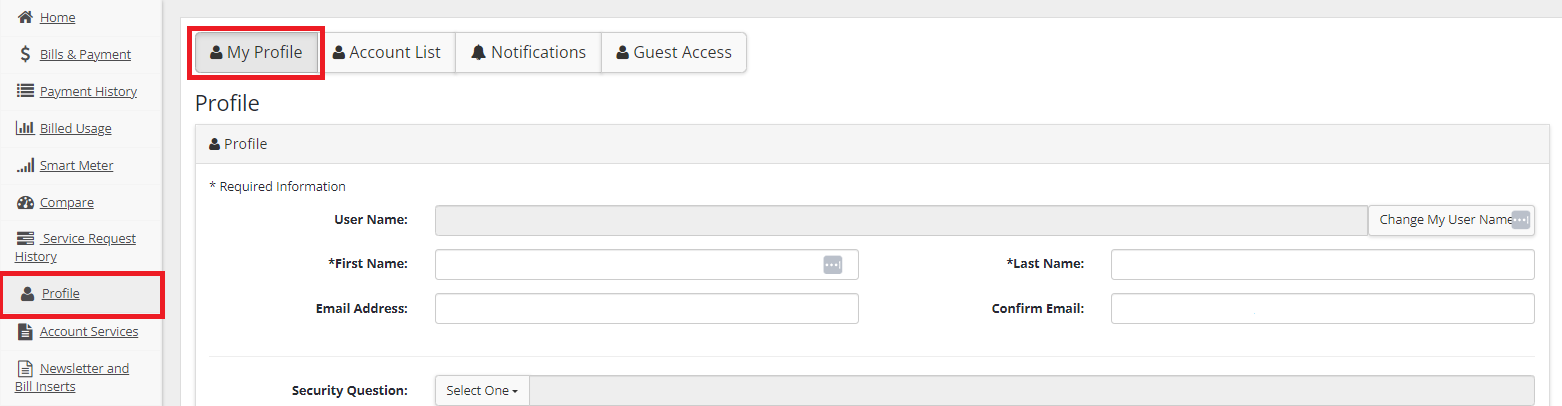
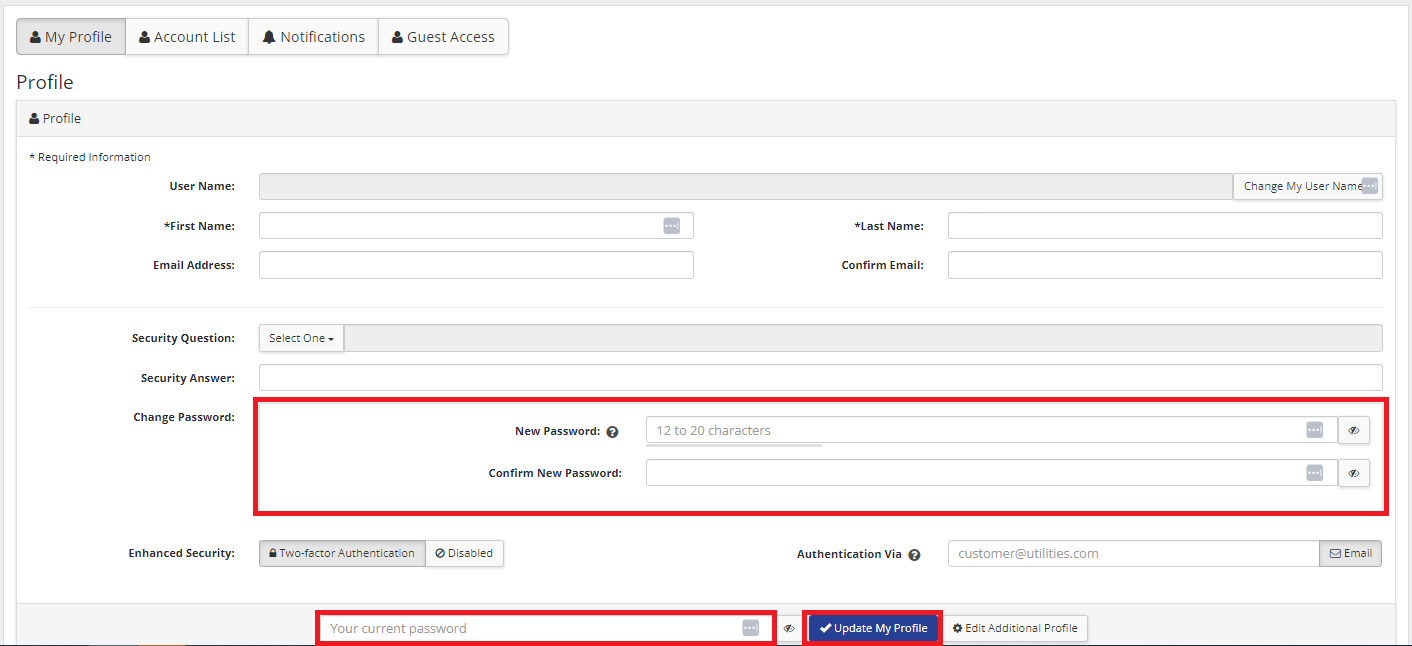
Scroll down to Change Password. Enter then confirm your new password. A good password is at least 12 characters, incorporates upper and lowercase letters, numbers, and special characters, and is not predictable.
You will be required to enter your old password in order to proceed with the change. Select “Update My Profile.”
Update Security Question
From the "Profile" tab found on the left-hand navigation, select "My Profile" located at the top of the page.
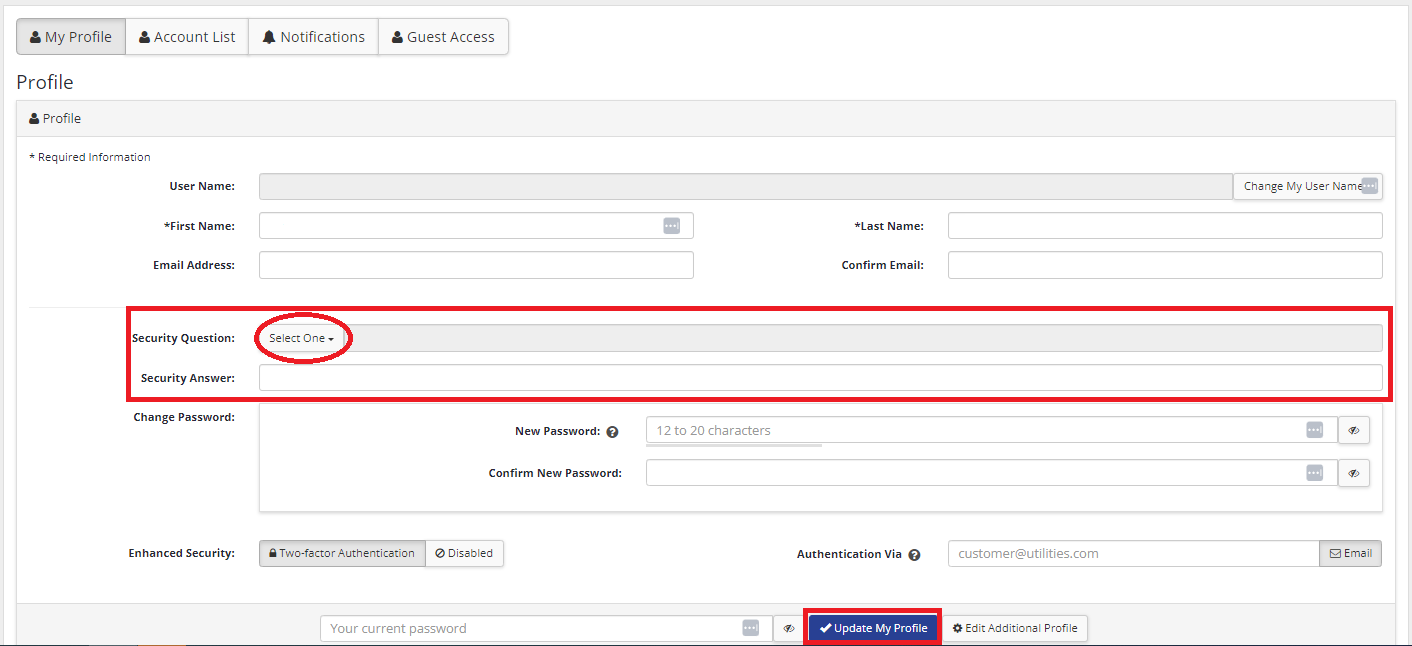
Scroll down to Security Question. Use the dropdown to select a pre-populated question or create your own. Input the answer in the “Security Answer” field. Select “Update My Profile.”
Implement Two-Factor Authentication
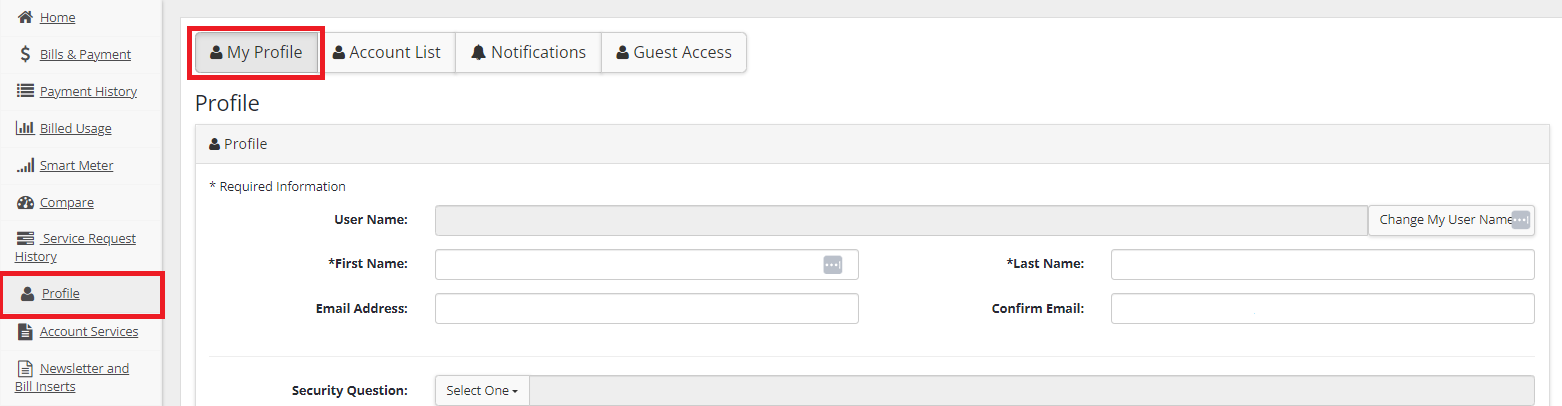
From the "Profile" tab found on the left-hand navigation, select "My Profile" located at the top of the page.
Scroll down to Enhanced Security. Select “Two-Factor Authentication.” Enter your email address in the “Authentication Via” field. Select “Update My Profile.”
- Your Account
